Ceci est une ancienne révision du document !
Reverse Proxy : TLS Passthrough SNI Forward and proxy pass with SSL offloading
The purpose of this guide is to configure a reverse proxy with two main components:
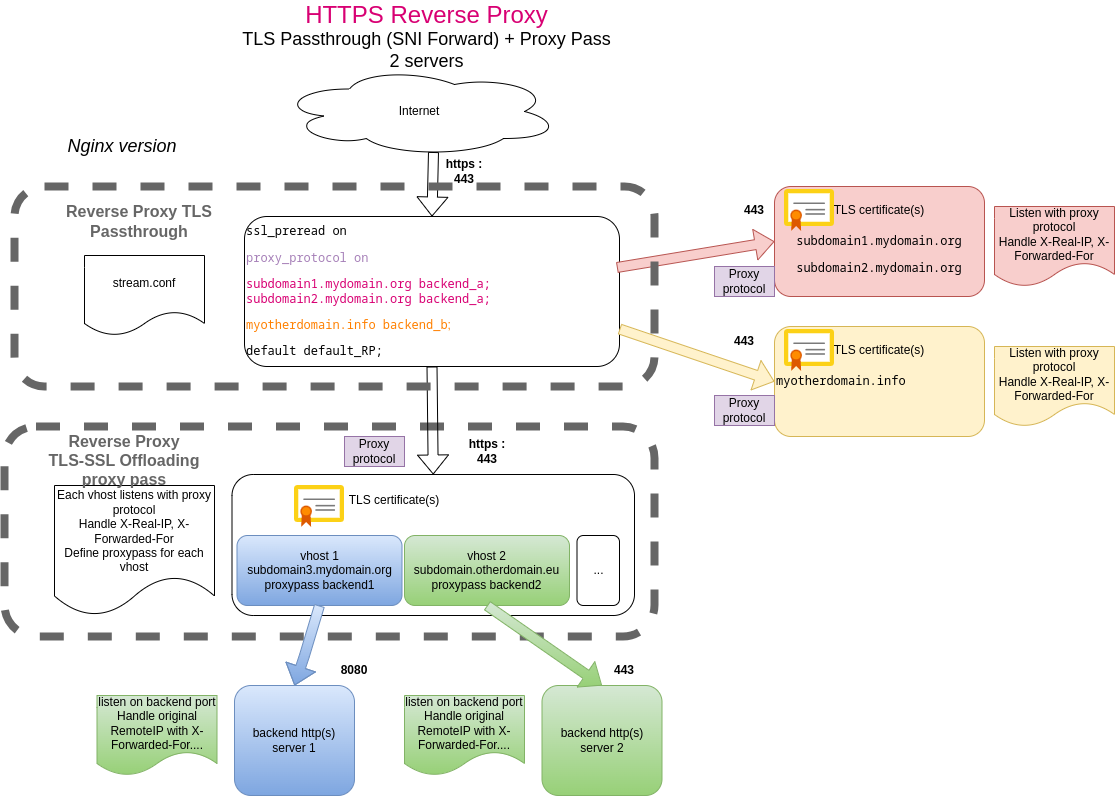
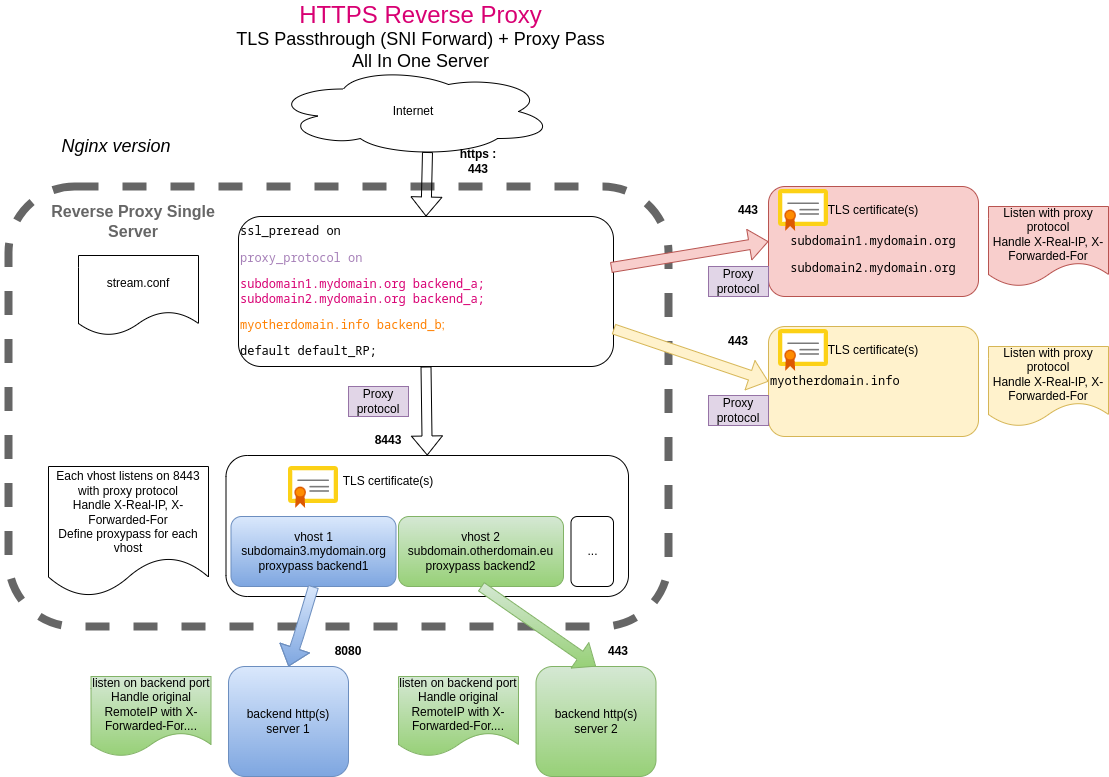
- A TLS passthrough Reverse proxy (SNI forward) : for self hosted and autonomous web application solution, each backend upstream servers is configured with its own cetificate. e.g : Yunohost.
- A reverse proxy with TLS offloading and proxy pass to any backend. This reverse proxy handles TLS connexion and certificate management with Let's Encrypt. Some add-on solution (WAF, IP Reputation…) could be added to this reverse proxy. This reverse proxy can be set up in the same server or in another server.
This documentation was tested with Nginx. Other Reverse Proxy or Web server software (HAProxy, Caddy, Apache httpd…) probably work the same way.
Technical references
These sites were used when configuring our reverse proxy. Many thanks to them. Please refer to these links for more details and configuration examples :
- Accepting the PROXY Protocol, NGINX Docs
- Module ngx_stream_map_module, NGINX Docs
- Understanding Nginx HTTP Proxying, Load Balancing, Buffering, and Caching by Justin Ellingwood, DigitalOcean
- NGINX passthough TLS real IP?, Stack Exchange
- Nginx real client IP to TCP stream backend, Stack Exchange
TLS passthrough (SNI forward)
For the first TLS entry point, nginx stream module is used in order to :
- pre_read domain called in the url
- forward TLS traffic to backend (without tls offloading)
Stream directives shoud be at same level than http server directives.
A stream.conf file should be created and called by nginx.conf
/etc/nginx/nginx.conf
include /etc/nginx/stream.conf;
with the following content :
/etc/nginx/stream.conf
stream {
  map $ssl_preread_server_name $selected_upstream {
    # all domains and sub domains using backend with TLS passthrough
    subdomain1.mydomain.org backend_a;
    subdomain2.mydomain.org backend_a;
    myotherdomain.info backend_b;

    # default to local reverse proxy - passthrough to a default RP going to handle ssl offloading for all other domain or redirect with appropriate errror page
    default default_RP;
  }

  upstream backend_a { server 192.168.99.11:443; }
  upstream backend_b { server 192.168.99.12:443; }
  upstream default_RP  { server 127.0.0.1:8443; }

  server {
    listen 192.168.99.1:443;
    proxy_pass $selected_upstream;
    proxy_protocol on;
    ssl_preread on;
  }
}
Explanations
Here is additionnal information regarding each part of stream.conf configuration.
Map domain preread to backend
First, map function is used to redirect domain to defined backend
  map $ssl_preread_server_name $selected_upstream {
    # all domains and sub domains using backend with TLS passthrough
    mysubdomain1.mydomain.org backend_a;
    mysubdomain2.mydomain.org backend_a;
    myotherdomain.info backend_b;

    # default to local reverse proxy - passthrough to a default RP going to handle ssl offloading for all other domain or redirect with appropriate error page
    default default_RP;
  }
Please note :
- Multiple subdomains/domains can use the same backend
- The default is a kind of catch all, all other domains will use the classical reverse proxy as backend
- ALL backend will receive https flow in a TLS passthrough configuration
And then backend are configured accordingly :
  upstream backend_a { server 192.168.99.11:443; }
  upstream backend_b { server 192.168.99.12:443; }
  upstream default_RP  { server 127.0.0.1:8443; }
Note : due to issue to handle ipv6, 127.0.0.1 is used instead of localhost (to avoid nginx error on ::1)
Listening and using proxy protocol
The main section adds parameters to stream directive to reverse proxy to appropriate backend with two important directives:
- ssl_preread
- proxy_protocol
  server {
    listen 192.168.99.1:443;
    proxy_pass $selected_upstream;
    proxy_protocol on;
    ssl_preread on;
  }
Adding HTTP and HTTPS (classical) Reverse Proxy
Not all (sub)domains will be covered by a TLS passthrough. Some apps will be covered by a classical reverse proxy approach, with ssl offloading and Let's Encrypt management, etc…
As a usual nginx usage, each (sub)domain coverage will be handled by a dedicated configuration in sites-available directory. Enabling a vhost is triggered by creating a symbolic link in sites-enabled directory.
HTTPS Reverse Proxy
This is a classical reverse proxy configuration to a backend (upstream) server. But in order to properly catch the user remote ip and send it to the backend (for security, troubleshooting reasons…) we need to properly listen with proxy protocol and set remote ip in headers.
server {
    server_name subdomain.otherdomain.eu;
    location / {
       include proxy.conf; #common proxy conf
       proxy_pass https://[upstreamserver]/; #Please replace [upstreamserver] with your backend application server internal ip or internal dns name.

       # Log real ip from proxy protocol - needed for upstream - backend server to get Real IP
       proxy_set_header X-Real-IP       $proxy_protocol_addr;
       proxy_set_header X-Forwarded-For $proxy_protocol_addr;


       # Security, Hardening
       # https://developer.mozilla.org/fr/docs/Mozilla/Add-ons/WebExtensions/manifest.json/content_security_policy
       add_header Content-Security-Policy "script-src 'self' 'unsafe-eval' 'unsafe-inline' blob:; object-src 'self'";
        }

    # Manage real ip from proxy protocol to get original client ip
    set_real_ip_from 127.0.0.1;
    real_ip_header proxy_protocol;

    listen [::]:8443 ssl proxy_protocol; # managed by Certbot
    listen 8443 ssl proxy_protocol; # managed by Certbot
    ssl_certificate /etc/letsencrypt/live/subdomain.otherdomain.eu/fullchain.pem; # managed by Certbot
    ssl_certificate_key /etc/letsencrypt/live/subdomain.otherdomain.eu/privkey.pem; # managed by Certbot
    include /etc/letsencrypt/options-ssl-nginx.conf; # managed by Certbot
    ssl_dhparam /etc/letsencrypt/ssl-dhparams.pem; # managed by Certbot
}
common proxy.conf snippet
 : TODO
HTTP (port 80) Reverse Proxy
http Reverse Proxy for application behind TLS Passthrough
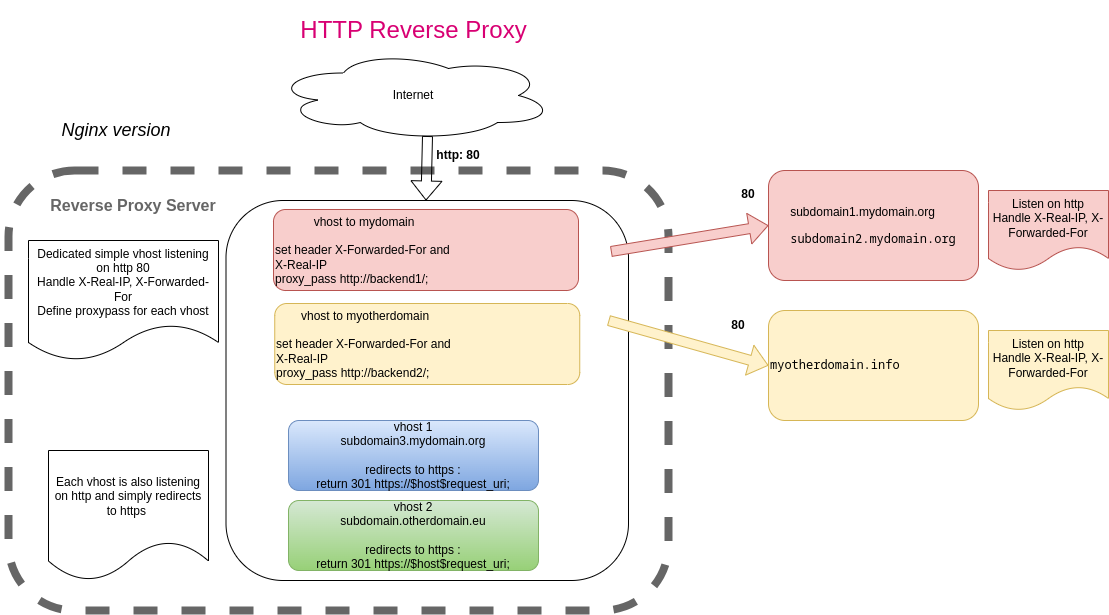
For backend behind TLS passthrough, a simple http reverse proxy can be set. Purpose of this simple http reverse proxy is to let backend handle redirection to https, and not break let's encrypt challenge using http for example.
server {
# a very simple reverse proxy to port 80 : forcing https and redirect will be handle by upstream
    listen 80 ;
    listen [::]:80 ;
    server_name subdomain1.mydomain.org subdomain2.mydomain.org;
    access_log /var/log/nginx/mydomain.org-access.log;
    error_log /var/log/nginx/mydomain.org-error.log;

    location / {
        # handle real ip, and send request to backend
        include proxy.conf;
        proxy_set_header X-Real-IP $remote_addr;
        proxy_set_header X-Forwarded-For $proxy_add_x_forwarded_for;
        proxy_pass http://192.168.30.5/; # backend application server internal address
    }
}
http Reverse Proxy for classical proxy pass reverse proxy
For all other application, http 80 port can be handled in the same vhost.
We wimply redirect any http url to https. On server directive :
server {
    if ($host = subdomain.otherdomain.eu) {
        return 301 https://$host$request_uri;
    }
        listen 80 ;
        listen [::]:80 ;
    server_name subdomain.otherdomain.eu;
    return 404; # managed by Certbot
}
Configuring backend application
http (port 80) backend behind Reverse Proxy
This backend is simply listening on http port 80 behind a classical proxy pass reverse proxy. Main custom configuration aims to get remote ip through headers set by reverse proxy upfront :
server {
    listen 80;
    listen [::]:80;
    server_name yunohost.mydomain.test;

    # Use real ip for http flow Please Replace [REVERSEPROXY_IP] with internal IPV4 of your reverse proxy
    set_real_ip_from [REVERSEPROXY_IP];
    real_ip_header    X-Real-IP;

#[...]
}
https behind TLS Passthrough Reverse Proxy
Upstream (backend) is behind TLS Passthrough Reverse Proxy. Configuration will be modified to listen on PROXY protocol behind reverseproxy and to catch real browser IP, for security and functional reason. This will log real ip in log files.
server {
    listen 443 ssl http2 proxy_protocol;
    listen [::]:443 ssl http2 proxy_protocol;
    server_name yunohost.mydomain.test;

    # Manage real ip from proxy protocol to get original client ip
    # Please Replace [REVERSEPROXY_IP] with internal IPV4 of your reverse proxy.
    set_real_ip_from [REVERSEPROXY_IP];
    real_ip_header proxy_protocol;

    # Log real ip from proxy protocol - needed for upstream - backend server to get Real IP
    proxy_set_header X-Real-IP       $proxy_protocol_addr;
    proxy_set_header X-Forwarded-For $proxy_protocol_addr;

#[...]
}
https behind Reverse Proxy
Backend server behind “classical” reverse proxy can listen on any port, http or https.
Thanks to http headers set by upfront reverse proxy, actual user remote ip is available and can be used for logging.
Here are some configuration examples :
Apache :
# Please Replace [REVERSEPROXY_IP] with internal IPV4 of your reverse proxy.
RemoteIPHeader X-Forwarded-For
RemoteIPInternalProxy [REVERSEPROXY_IP]/32
: nginx configuration
Yunohost backend
Setting Yunohost behind a TLS Passthrough Reverse Proxy will let Yunohost handle certificate and keep most of the native configuration quite like behind a direct connexion. Once yunohost domains are configured in Reverse proxy, Yunohost owner can manage yunohost app and certificate independantly.
Nevertheless, some configuration changes are needed :
- Listening on port 443 behind TLS passthrough reverse proxy should be configured to listen as PROXY protocol.
- Some app are doing internal call without going through reverse proxy. This should be handled as classical https, thus PROXY protocol should be used only on interface behind reverse proxy.
- Listening on port 80 behind usual reverse proxy will be configured to catch browser real ip. http connexion are mostly redirected to https or used for Let'sencrypt challenge.
- Other ports won't be covered, please see limitations
Limitations
This configuration comes with some limitations :
- Only http and https port are covered : XMPP, E-mail or other port are not covered. This configuration focuses on hosting Yunohost http(s) services. Outgoing emails are still possible but incoming emails should be handled by a special incoming mail gateway, so please be careful about bounces management.
- IPv6 is not properly handled here. This documentation was made for internal ipv4 network, even if ipv6 can remain activated in Yunohost server.
- Banning remote ip with fail2ban and iptables does not work in this configuration (work in progress)
http listeners
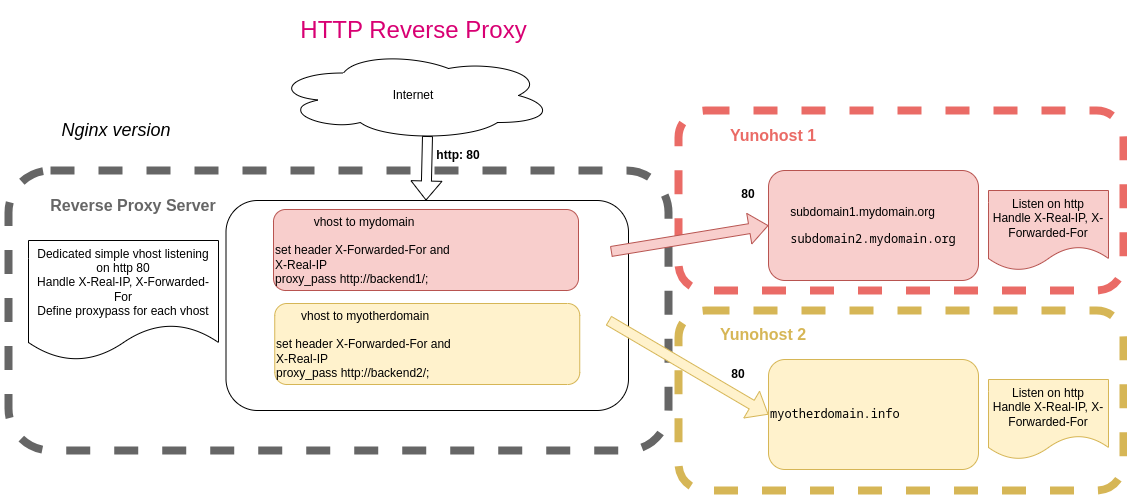
We assume that a reverse proxy is configured as described above to proxy to Yunohost. For security purpose, for tracing connexion, configuration is simply modified to get browser real IP with X-Real-IP headers.
First, create a custom snippet. Please Replace [REVERSEPROXY_IP] with internal IPV4 of your reverse proxy.
/etc/nginx/snippets/YunoHost_behind_http_RP.inc
# Configuration for YunoHost behind http proxy

# Use real ip for http flow Please Replace [REVERSEPROXY_IP] with internal IPV4 of your reverse proxy
set_real_ip_from [REVERSEPROXY_IP];
real_ip_header    X-Real-IP;
In all nginx configuration file, simply include this snippet in server directive on port 80 :
server {
    listen 80;
    listen [::]:80;
    server_name yunohost.mydomain.test;

    # YunoHost behind http Reverse Proxy
    include /etc/nginx/snippets/YunoHost_behind_http_RP.inc;

#[...]
}
https listeners
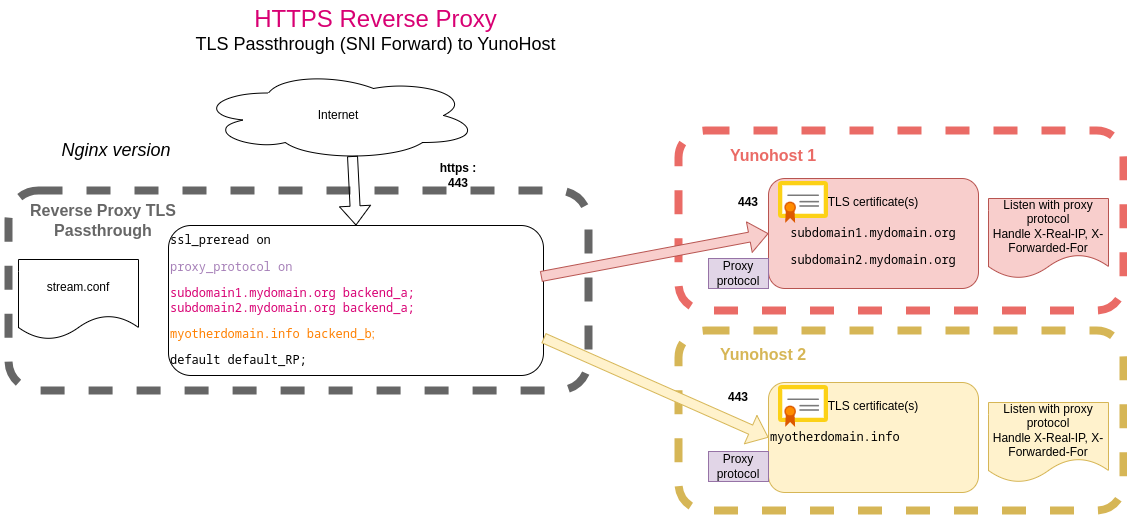
We assume that a reverse proxy is configured as described above to proxy to Yunohost. Configuration will be modified to listen on PROXY protocol behind reverseproxy and to catch real browser IP, for security and functional reason. This will log real ip in log files and let fail2ban correctly monitor the actual client ip.
Unfortunately fail2ban is currently triggering iptables rules. But banning ip in firewall won't work behind the reverse proxy. TODO : Find a way to actually ban remote ip (e.g. in nginx)
Create a custom snippet. Please Replace [YUNOHOST_INTERFACE_IP] with internal IPV4 of YunoHost interface listening on https behind Reverse Proxy. Please Replace [REVERSEPROXY_IP] with internal IPV4 of your reverse proxy.
/etc/nginx/snippets/YunoHost_behind_https_TLSPT_RP.inc
# Configuration Yunohost behind TLS PAssthrough - SNI Forward Reverse Proxy
# Add proxy protocol in listen directive for external ipv4 interface only
# Please Replace [YUNOHOST_INTERFACE_IP] with internal IPV4 of YunoHost interface listening on https behind Reverse Proxy.
listen [YUNOHOST_INTERFACE_IP]:443 ssl http2 proxy_protocol;

# Manage real ip from proxy protocol to get original client ip
# for interface using proxy_protocol
# Please Replace [REVERSEPROXY_IP] with internal IPV4 of your reverse proxy.
set_real_ip_from [REVERSEPROXY_IP];
real_ip_header proxy_protocol;

# Log real ip from proxy protocol - needed for upstream - backend server to get Real IP
proxy_set_header X-Real-IP       $proxy_protocol_addr;
proxy_set_header X-Forwarded-For $proxy_protocol_addr;
In all nginx configuration file, simply include this snippet in server directive on port 443 :
server {
    listen 443 ssl http2;
    listen [::]:443 ssl http2;
    server_name yunohost.mydomain.test;

    # YunoHost behind TLS Passthrough SNI Forward Reverse Proxy
    include /etc/nginx/snippets/YunoHost_behind_https_TLSPT_RP.inc;
#[...]
}